 EXT.04 — ScrapeMaster
Extract data from any website in seconds
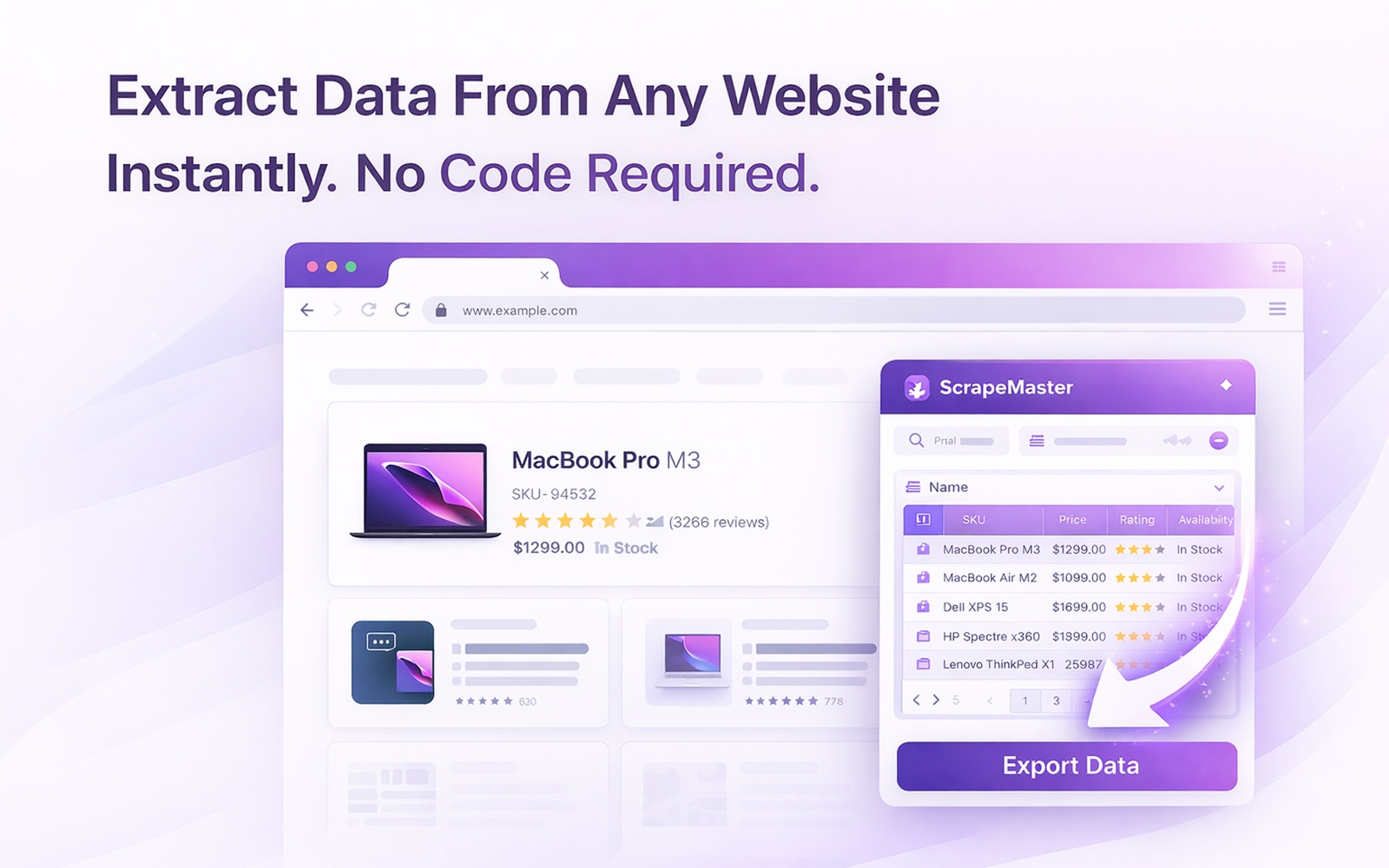
One-click data extraction from any webpage. AI auto-detects products, jobs, listings, and tables. Handles pagination, infinite scroll, and detail pages. Export to CSV, XLSX, JSON, or Google Sheets. No coding, no accounts, no limits — completely free.
The specifics.
Concrete behaviour, not benefit-soup. If we say a feature works, you can test it in 30 seconds and prove us wrong.
AI-powered auto-detection
Click once and ScrapeMaster analyzes the page, detects repeating data patterns, and names columns intelligently — no setup, no selectors, no coding.
Full scraping pipeline
Handles next-page buttons, load-more buttons, numbered pagination, infinite scroll, and even follows links to detail pages for deeper data.
Export anywhere
Download as CSV, XLSX, or JSON. Or copy directly to clipboard for instant paste into Google Sheets, Excel, or your CRM.
Three steps, under ten seconds.
Click the icon
ScrapeMaster opens in a side panel and auto-detects data in 2–4 seconds. An editable table appears instantly.
Customize & expand
Rename columns, remove unwanted ones. Enable pagination or follow item links to scrape across multiple pages.
Export your data
Click Extract to pull all records with live progress, then download as CSV, XLSX, JSON, or copy for Google Sheets.
People who actually need this.
Sales & marketing
Extract competitor pricing, product listings, lead directories, and review data for analysis and outreach.
Recruiters & HR
Gather candidate lists from job boards — names, titles, companies, contact info — exported straight to your ATS.
Researchers & analysts
Collect structured data from any public source — real estate listings, academic papers, government records, news archives.
Things people ask before installing.
Honest answers — including where we say no. If something here doesn't answer your question, email actuallyusefulextensions@gmail.com.
Is ScrapeMaster really free?
Yes. No paid tier, no row limits, no credit card. You can extract as much data as your machine can hold.
Is web scraping legal?
Scraping publicly accessible data is generally legal in most jurisdictions, but specific use cases — re-publishing copyrighted content, violating a site's Terms of Service, scraping personal data subject to GDPR / CCPA — can raise legal issues. ScrapeMaster is a neutral tool; how you use it is your responsibility. We have several blog posts that go deeper on the legal landscape (LinkedIn, GDPR, CCPA, the EU AI Act).
Do I need to know CSS selectors or coding?
No. ScrapeMaster auto-detects repeating patterns on most pages within 2–4 seconds. You can rename columns, remove unwanted ones, and follow links to detail pages without writing a single selector.
Does it work on JavaScript-heavy sites (React, Vue, Angular)?
Yes. Because the extension runs inside your browser, it sees the page after JavaScript has rendered — exactly as you do. SPAs, infinite scrollers, and dynamic React components are all fair game.
Can it handle pagination and infinite scroll?
Yes. ScrapeMaster auto-detects Next-page buttons, Load-more buttons, numbered pagination, and infinite-scroll patterns. Extraction proceeds page by page with live progress shown in the side panel.
Can it follow links to detail pages and extract from those too?
Yes. The "Follow detail" feature opens each item's link in a background tab, extracts the additional fields you've defined, and merges them back into the main result table.
Will it get me blocked from sites?
ScrapeMaster uses your normal browser session and paces requests naturally. Heavy or rapid extraction on aggressive anti-bot sites (LinkedIn, Cloudflare-protected sites) can still trigger blocks; you can configure extraction delays to throttle as needed. The extension does not rotate proxies or fingerprints.
What export formats are supported?
CSV, XLSX (Excel-compatible), JSON, and direct clipboard for paste into Google Sheets, Excel, or any CRM. Exports save locally to your downloads folder.
Does my extracted data leave the browser?
No. Extracted records are stored locally in IndexedDB. The only network request is during auto-detect, when the page's HTML structure (not its content) is sent to our analysis API to suggest selectors. Your extracted data itself is never uploaded.
Can it bypass paywalls or login walls?
No. ScrapeMaster extracts data from pages you can already see in your browser. It does not bypass paywalls, defeat login requirements, or solve CAPTCHAs. If you can see it logged-in, ScrapeMaster can extract it.
Can I save my extraction configurations and reuse them later?
Yes. ScrapeMaster saves your column setup, pagination rules, and detail-follow configuration per domain. Visiting the same site later re-applies the saved configuration automatically.
Which browsers does it work on?
Chrome, Edge, Brave, Arc, and any Chromium-based browser. The extension uses Chrome's Side Panel API which is not available in Firefox or Safari.
Can I use it to scrape business contact info from an online directory?
Yes — this is one of the most common ScrapeMaster use cases. Open the directory search results page, click ScrapeMaster, and it auto-detects the repeating columns (business name, phone, email, category, address). Enable pagination to follow the "next page" button through every result page, and enable "follow detail pages" if you want per-business data from each listing. Export as CSV for direct CRM import. Stick to publicly displayed org-level contact info (business phone, info@ emails, addresses) to stay on the right side of GDPR / CCPA.
Is scraping websites illegal?
No — scraping publicly displayed data from websites is legal in the US, EU, UK, and most other jurisdictions. It becomes potentially illegal when you bypass authentication, scrape personal data without a legal basis under GDPR / CCPA, violate a Terms of Service you explicitly accepted, or send enough traffic to disrupt the site. Public non-personal data at a reasonable rate is well-established as legal. See our full guide on the legal boundaries at /blog/is-web-scraping-legal/.
Is web scraping legal?
Yes — scraping publicly accessible data is legal in the US, EU, and UK, and was confirmed by hiQ Labs v. LinkedIn. It becomes illegal when you bypass authentication (violates the CFAA), scrape personal data without a GDPR / CCPA basis, breach a Terms of Service you explicitly accepted, or overload the site. Public non-personal data at a reasonable rate is well-established as legal.
Can I legally scrape LinkedIn?
Scraping public LinkedIn profiles was ruled legal by US courts in hiQ Labs v. LinkedIn (Ninth Circuit, 2022, upheld 2019 injunction) because public data isn't protected by the Computer Fraud and Abuse Act. LinkedIn's Terms of Service still prohibit scraping and they can ban accounts; personal data scraped may trigger GDPR obligations in the EU. Legality is jurisdiction-specific.
How do I scrape data from a website without coding?
Install ScrapeMaster, open the page you want to scrape, and click the extension icon. It auto-detects repeating patterns — product listings, job posts, business directories, tables — in 2 to 4 seconds, shows an editable preview, and lets you export as CSV, XLSX, JSON, or paste directly into Google Sheets. No selectors, no scripts, no accounts.
What is the best free web scraper for Chrome?
ScrapeMaster is a top free option: one-click AI auto-detection of tables, listings, and products, no coding required, handles pagination and infinite scroll, follows detail-page links, and exports to CSV, XLSX, JSON, or clipboard for Google Sheets. Genuinely free with no row limits and no paid tier, runs locally in Chrome, and works on JavaScript-heavy sites (React, Vue, Angular).
Can I scrape a website that requires login?
Yes — with ScrapeMaster you can scrape any page you're already logged into, because the extension runs inside your authenticated Chrome session. Server-based scrapers can't do this without you handing over credentials. Note: scraping personal data behind a login can raise GDPR / CCPA and Terms of Service issues; scraping your own data (from a dashboard you use) is generally safe.
How much does a web scraper cost?
Free Chrome extensions like ScrapeMaster cost $0 for unlimited use. Hosted no-code scrapers (Octoparse, ParseHub, Bright Data) charge $75 to $500 per month for meaningful volume. Custom scrapers with proxies, CAPTCHA solvers, and cloud runners cost $200 to $2,000 per month depending on scale. For most sales, research, and analyst use cases, a free extension covers 90% of the job.
Do I need permission to scrape a website?
No general permission is required for publicly accessible data. You do need permission (or a lawful basis) when the data is behind a login, includes personal information covered by GDPR / CCPA, is copyrighted content you plan to republish, or when a site's Terms of Service — which you accepted at signup — explicitly forbid scraping. Public non-personal data at a reasonable rate is fine.
How do I export website data to Excel?
Three options: copy-paste the table directly into Excel (works if it's a simple HTML table); use Excel's Data > From Web feature and paste the URL (Excel imports HTML tables automatically); or install ScrapeMaster, click extract, and download as XLSX — best for JavaScript-heavy sites and multi-page listings where copy-paste and Excel's importer both fail.
Prefer step-by-step? There's a short guide for every feature — what each setting does, where it lives, and where it stops working.
How to use ScrapeMaster →Have a more specific question? Our full FAQ covers 109+ answers — including site-specific guides (Twitter, Reddit, LinkedIn, Substack, Medium, Wikipedia, Notion), comparisons, and troubleshooting.
See the full FAQ →Install ScrapeMaster.
Free forever. No account. Two clicks. Uninstall in two more if it doesn't help.
Add to Chrome →