 EXT.03 — Anything → PDF
Convert files and web pages to PDF — instantly, privately, free
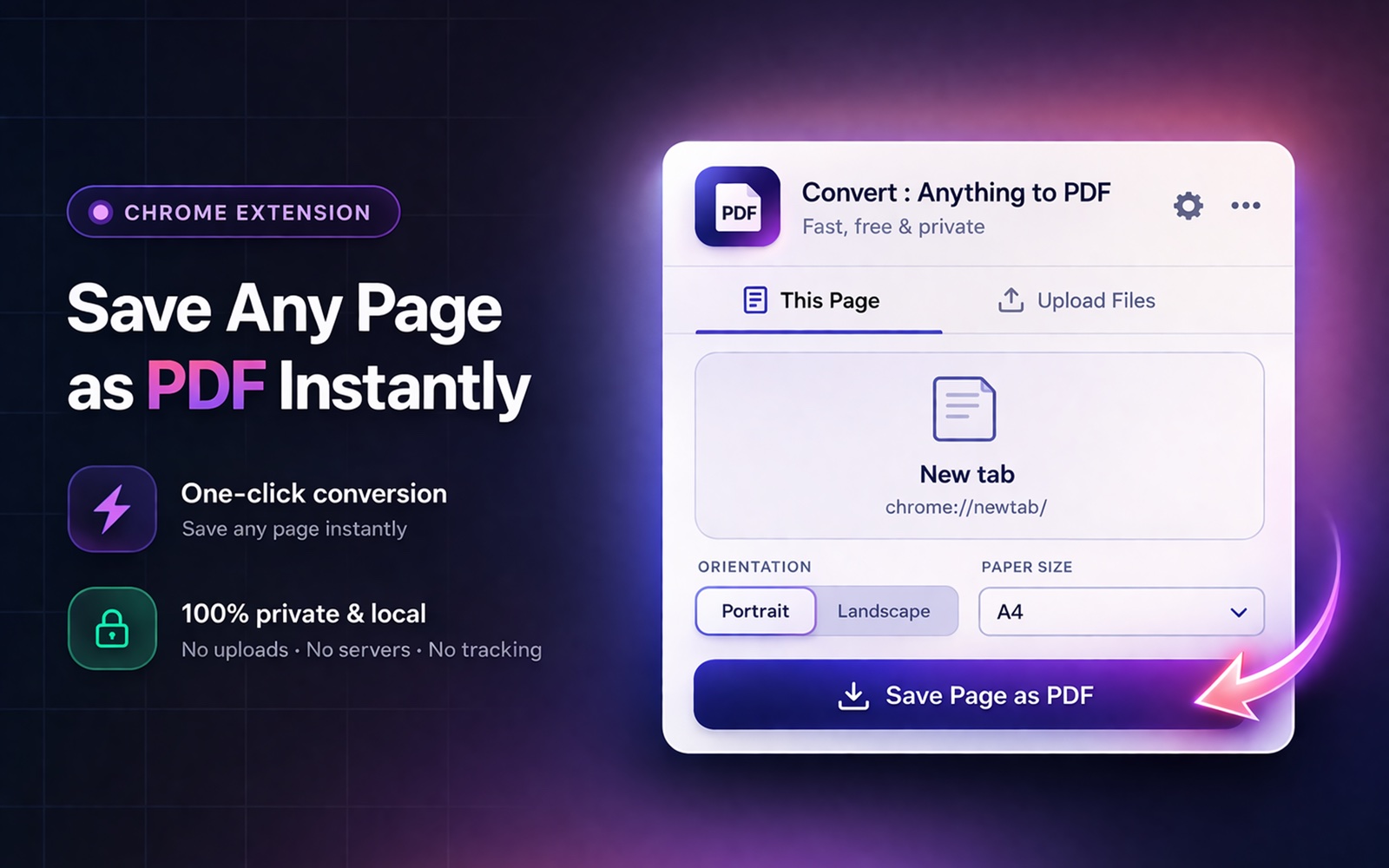
Convert images, documents, spreadsheets, and web pages to PDF with one click. Supports JPG, PNG, CSV, HTML, Markdown, and more. Merge multiple files into a single PDF. No watermarks, no file size limits, no accounts.
The specifics.
Concrete behaviour, not benefit-soup. If we say a feature works, you can test it in 30 seconds and prove us wrong.
Any format, one tool
Images (JPG, PNG, WebP, SVG, GIF, BMP), text files (TXT, HTML, JSON, XML, Markdown), spreadsheets (CSV with formatted tables), and any web page — all from one extension.
Merge files into one PDF
Drag and drop multiple files and combine them into a single PDF document. Auto-landscape for wide CSV data with 6+ columns.
Zero watermarks, zero limits
Your PDFs are yours. No branding, no watermarks, no file size limits, no conversion caps. File conversions happen 100% on-device.
The full list.
14 formats supported in one extension — each one paired with a concrete scenario and a real-world use case so you can see whether it fits how you actually work.
JPEG / JPG → PDF
Bundle photos, scans, or stock images into a single PDF.
Use caseA real estate agent stitching property photos into one client-ready brochure.
PNG → PDF
Compile lossless screenshots and graphics into a review PDF.
Use caseA product designer assembling UI mockups for a stakeholder approval doc.
WebP → PDF
Turn modern web-optimised images into a portable PDF archive.
Use caseA content team archiving a folder of WebP downloads so they open on any device, anywhere.
SVG → PDF
Convert vector logos and diagrams into stamped, fixed-size PDFs.
Use caseA marketer preparing a brand-asset sheet for an external printer or licensing review.
GIF → PDF
Convert the first frame of an animated GIF into a static figure.
Use caseA researcher embedding reference GIFs as static figures in a thesis PDF.
BMP → PDF
Convert legacy Windows-format scans without quality loss.
Use caseA paralegal modernising old BMP case-file scans into shareable PDFs for court submission.
TXT → PDF
Bundle plain-text notes, logs, or source drafts into one PDF.
Use caseA writer consolidating their plain-text drafts into a single PDF for offline editing on an iPad.
HTML → PDF (local file)
Render a local .html file as a shareable PDF without spinning up a server.
Use caseA developer turning a static HTML test report into a PDF for the QA review meeting.
Markdown (MD) → PDF
Convert technical notes, docs, and exports into typeset PDFs.
Use caseAn engineer submitting Markdown design docs from Obsidian or Notion to a compliance review board.
JSON → PDF
Attach a JSON payload to a bug report or audit log as a printable PDF.
Use caseA QA engineer documenting a regression by exporting the failing API response into a ticket-ready PDF.
XML → PDF
Export structured data dumps as readable PDFs for audit submission.
Use caseA healthcare admin attaching an HL7 / FHIR XML extract to a regulatory compliance audit.
CSV → PDF (auto-formatted table)
Turn a CSV export into a board-ready table PDF. Auto-detects wide tables (6+ columns) and switches to landscape.
Use caseA finance analyst converting a P&L CSV from QuickBooks into a presentation-ready PDF for the monthly board meeting.
Excel → CSV → PDF (workflow)
Excel (.xlsx) isn't supported directly — export to CSV first (File → Save As → CSV), then convert.
Use caseA consultant turning client Excel deliverables into branded PDF reports without round-tripping through a paid PDF tool.
Web page (active tab) → PDF
Save the page you're currently viewing as a PDF, including login-protected content.
Use caseA journalist archiving a paywalled article they're already logged into as PDF evidence for source citations.
Three steps, under ten seconds.
Click the extension
Choose "This Page" to convert the current web page, or "Upload Files" to convert local files.
Drop your files
Drag and drop any supported files. Select paper size (A4, Letter, Legal) and orientation.
Download your PDF
Click Convert — the PDF downloads instantly. No upload, no waiting.
People who actually need this.
Office workers
Quickly convert spreadsheets, reports, and documents to PDF for sharing with clients and colleagues.
Designers & creatives
Convert mockups, images, and assets to PDF for client review. Merge multiple images into one portfolio PDF.
Students & academics
Convert lecture notes, HTML pages, and research data (CSV) to clean PDFs for study and submission.
Things people ask before installing.
Honest answers — including where we say no. If something here doesn't answer your question, email actuallyusefulextensions@gmail.com.
Is Convert: Anything to PDF really free?
Yes. No watermarks, no file size limits, no premium tier, no account required. The extension is funded by us, not by ads or your data.
What file formats can I convert?
Images (JPG, PNG, WebP, SVG, GIF, BMP), text files (TXT, HTML, JSON, XML, Markdown), spreadsheets (CSV), and any active web page. See the full format breakdown above for scenarios and concrete use cases.
Can I convert Excel (.xlsx) spreadsheets directly?
Not directly. Export your spreadsheet to CSV first (in Excel: File → Save As → CSV; in Google Sheets: File → Download → Comma-separated values), then drop the CSV into the extension. CSVs with 6+ columns auto-detect as wide and switch to landscape orientation.
Can I merge multiple files into one PDF?
Yes. Drag in any number of files (mixed formats are fine — e.g. 3 images + 1 CSV + 1 Markdown file) and they'll be combined into a single PDF in the order you list them. There's no merge limit.
Is there a file size limit?
No. Because conversion happens entirely on your device, the only practical limit is your computer's available memory. We've tested with multi-hundred-page PDFs and large image batches without issue.
Are watermarks added to the output PDF?
No. Ever. The PDF you generate is yours, unbranded. The only marks in the output are whatever was in the source file.
Will my files be uploaded anywhere?
No. The extension makes zero network requests during file conversion — everything runs locally in your browser using bundled libraries (jsPDF for files, Chrome's DevTools Protocol for web pages). Your files never touch any server.
Does it preserve image quality?
Yes. Image conversion preserves the source resolution; PDFs are generated without quality loss. For 300 DPI scans, the output is print-ready.
Can it handle password-protected source files?
No — encrypted PDFs and password-protected source files can't currently be read. For all other formats (images, text, CSV) encryption isn't relevant. The output PDFs are not password-protected.
What paper sizes are supported?
A4, US Letter, US Legal, and Tabloid. Orientation (portrait / landscape) is selectable per conversion. CSV exports with many columns auto-switch to landscape.
Which browsers does it work on?
Any Chromium-based browser: Chrome, Edge, Brave, Arc, Opera, Vivaldi. Firefox and Safari are not supported because the underlying APIs differ.
How do I uninstall it?
Right-click the extension icon and choose "Remove from Chrome", or visit chrome://extensions and click Remove. The extension stores no persistent data, so there's nothing to clean up after.
Is this the same as "anyfile to PDF" or "any file to PDF"?
Yes — Convert: Anything to PDF is the tool people are usually looking for when they search for "anyfile to PDF" or "any file to PDF". It converts any supported file (JPG, PNG, WebP, SVG, GIF, BMP, TXT, HTML, Markdown, JSON, XML, CSV) plus any open browser tab into a real PDF, all on your device, with no upload, no watermark, and no account.
Is this a free alternative to Adobe Acrobat?
For file-to-PDF conversion and web-to-PDF, yes — Convert: Anything to PDF replaces the parts of Adobe Acrobat most people actually use, at $0 and without an Adobe account. Acrobat still wins for advanced PDF editing (rewriting existing PDF text, form design, digital signatures with certificate chains, enterprise redaction). For conversion workflows, this extension does the job locally, unlimited, with no subscription.
How do I convert HTML to PDF?
Three main options: open the .html file in Chrome and press Ctrl+P > Save as PDF, drop it into Convert: Anything to PDF for batch conversion, or use wkhtmltopdf / Puppeteer / WeasyPrint for automated workflows. The Chrome route is free and takes 5 seconds; the extension handles many files at once and merges them into a single PDF.
How do I save an HTML file as a PDF?
Drag the .html file into a Chrome tab, press Ctrl+P (Cmd+P on Mac), set Destination to Save as PDF, and click Save. To convert several .html files at once, install Convert: Anything to PDF, drag the files into the drop zone, and merge them into one PDF in a single click.
How do I convert an MHTML file to PDF?
Open the .mhtml file in Chrome (drag it into a tab — Chrome opens MHTML natively), then press Ctrl+P and choose Save as PDF. Firefox and Safari don't open MHTML by default. For bulk conversion of many MHTML files, use Convert: Anything to PDF, which batches file drops in one click and preserves embedded images and CSS.
Can I convert code files to PDF with syntax highlighting?
Yes. Convert: Anything to PDF renders source code with syntax highlighting for 100+ languages, keeps indentation and line numbers intact, and paginates long files cleanly. Drop .js, .py, .ts, .go, .rs, .cpp, .java, .html, .css, .sql, .json, .yaml, or any code file into the extension and export.
Does Convert: Anything to PDF support batch conversion?
Yes. Drop multiple files of any supported type into the extension at once and it merges them into a single PDF in your chosen order, or exports each as a separate file. Common uses: combining scanned invoices, batch-converting HTML reports, merging code review documents, or building a portfolio from mixed images and markdown.
Is my file uploaded to a server?
No. Convert: Anything to PDF processes every file locally inside your Chrome browser. Nothing is uploaded, no account is required, and the extension has no analytics or trackers. This matters for confidential documents, work-laptop restrictions, and regulated industries.
Prefer step-by-step? There's a short guide for every feature — what each setting does, where it lives, and where it stops working.
How to use Convert: Anything to PDF →Have a more specific question? Our full FAQ covers 104+ answers — including site-specific guides (Twitter, Reddit, LinkedIn, Substack, Medium, Wikipedia, Notion), comparisons, and troubleshooting.
See the full FAQ →Install Convert: Anything to PDF.
Free forever. No account. Two clicks. Uninstall in two more if it doesn't help.
Add to Chrome →